
Casa Alise · Guest information
Welcome to Casa Alise
House manual and check-in instructions
Wi-Fi
- Network
www.casaalise.eu- Password
enjoythesun
Need help?
Check-in and check-out
- Check-in
- 16:00
- Check-out
- 10:00
Download as PDF
The PDF versions, to read offline or print.
- Check-in and house manual PDF · 1.2 MB (opens in new tab)
- Tourist guide PDF · 1.0 MB (opens in new tab)
Thank you for booking with us! We hope you will enjoy your stay at Casa Alise in the Cinema House building in Los Boliches, Fuengirola. To help you have a great holiday, we have put together this guide for you.
Visit en.casaalise.eu for more about the apartment, and for guides to activities and things to experience in the area.
Before you travel to Spain
Before you leave for Spain, please make sure you have sent us:
- the day and time you arrive at Málaga Airport
- your contact details (phone and email)
- whether you need the private parking space in the garage
Tourist registration
Only for guests who are not resident in Spain.
Spanish regulations require every guest who is 14 or older at the time of the stay to fill in the "Tourist registration" form. All guests are registered in the same form: click "Add another guest" for each person, and "Submit" at the end.
Check-in and check-out
Check-in is at 16:00 and check-out at 10:00, unless another time has been agreed. Early check-in and late check-out depend on the cleaning and on whether other guests are arriving or leaving that day.
Before you arrive, we will send you the codes for the building and the apartment.
Doors and keys
- The building and the apartment have electronic locks. The codes are sent before you arrive.
- The doors lock automatically when they close.
- A set of keys hangs on the wall behind the entrance door. The keys open the apartment, the building, the sauna and the gym.
- You only need the keys for the apartment and the building if there is a power cut – otherwise everything is keyless.
If you bring a car, you will also get information on how to collect the garage door opener.
Check-out: hang all the keys and the garage door opener back on the hook in the hallway before you leave. If you have a car, drive it out of the garage first, then return the garage door opener and leave.
Building rules
Pool
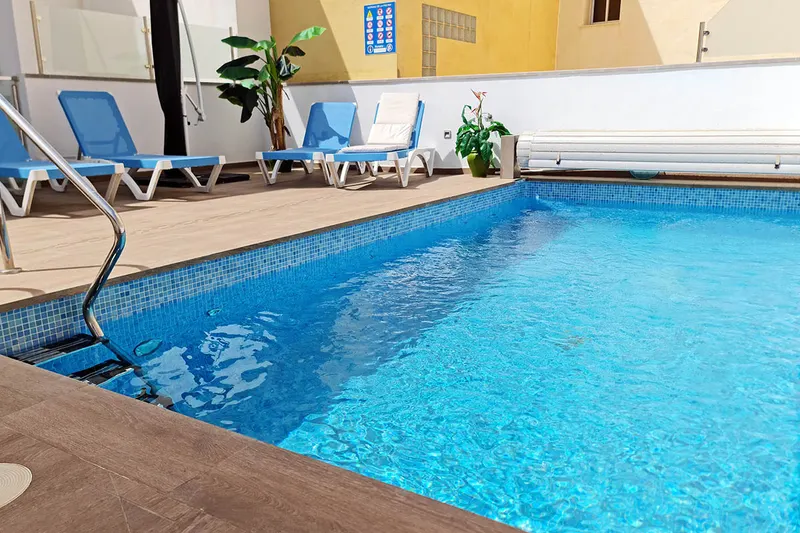
The pool is on the 4th floor. The remote control for the pool cover is by the window near the entrance. Use it to open the cover before you swim, and remember to close it again when you have finished. Please leave the remote where you found it.
To keep things safe and tidy for everyone:
- Keep all shared doors and gates closed. The door to the garage must be closed, but not locked.
- Do not bring glass into the pool area.
- Take your rubbish with you when you leave.
- Babies and toddlers must wear swim nappies in the pool.
Roof terrace and sunbeds
The roof terrace is on the same floor as the pool. To get there:
- Press the grey button by the gate and stairs.
- Open the gate by hand.
- Lock the gate when you leave.
After sunbathing, please put the sunbeds back where they were.
Gym and sauna
The gym is in the garage, near the parking space, and the sauna is inside the gym.
- Please lock the gym door after use.
- Children under 14 must be accompanied by an adult.
Parking
You have a private parking space in the garage. The street outside is for pedestrians only, but the apartment has a special licence that allows you to drive there to park.
To register your car for the licence, we need:
- the car's registration number, make, model and colour
- the name of the owner or driver, and the rental company if it is a hire car
Driving in the street without being registered with the town hall can lead to fines, which are not covered by the owner.
Kitchen
Please do not put hot pots or pans directly on the kitchen worktop, as they can leave burn marks.
Quiet hours
Please keep the noise down after 22:00 and before 09:00.
Smoking
Smoking is not allowed inside the apartment or in the shared areas. You are welcome to smoke outside the building or on the balcony.
Air conditioning and heating
The air conditioning is very effective. Please turn it off when you leave the apartment or have the terrace door open. These are the functions you need – please do not change any other system settings.
 On/off: press this icon to switch the zone where the thermostat is on or off.
 Temperature: press the temperature and use − and + to choose the temperature you want (in steps of 0.5 °C).
 Mode: shows the current operating mode. The mode can only be changed on the main thermostat in the living room. The modes are:
 Ventilation – fan only
- Cooling – cooling only
 Heating – heating only
 Dry – cools the room gently and reduces the humidity
The bathrooms have no air conditioning, only underfloor heating. The building turns the underfloor heating off in the warm season, and it cannot be controlled from the apartment.
Spotlights and dimming
The spotlights controlled from the hallway can be dimmed. A short press turns them on or off. When they are on, press and hold to dim them up or down.
Windows in the bedrooms
The windows open sideways or tilt inwards, depending on the position of the handle:
- Down = locked
- Right = opens sideways
- Up = tilts inwards
Always close the window completely before you turn the handle. Otherwise a hinge can pop out, and the window will not close.
Blinds in the bedrooms
Use only short presses on the up and down buttons. To stop a blind halfway, give the button another short press when it is where you want it. Holding the button down for long can push the blind out of position. Make sure nothing is in the window when the blind closes, as it can break the motor.
Rubbish
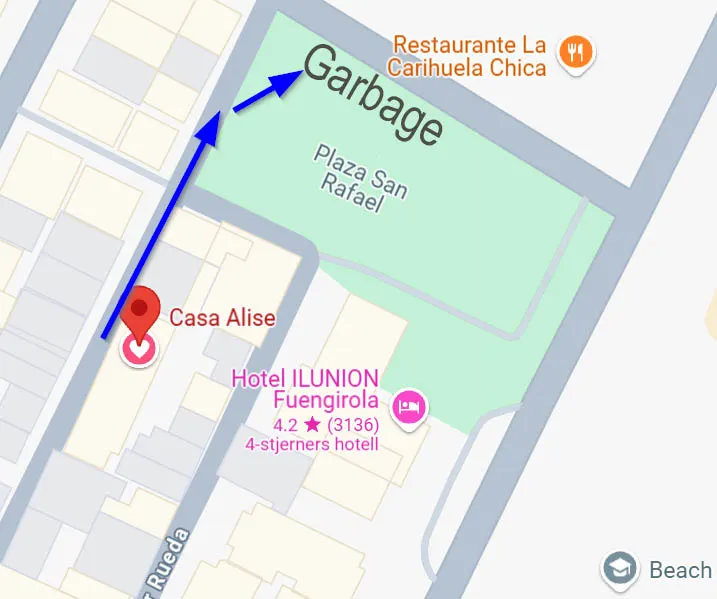
The rubbish bins are outside the building. Go out of the main door and turn right into the open square. The bins are straight ahead.
Robot vacuum cleaner
The apartment has a robot vacuum cleaner that is very easy to use.
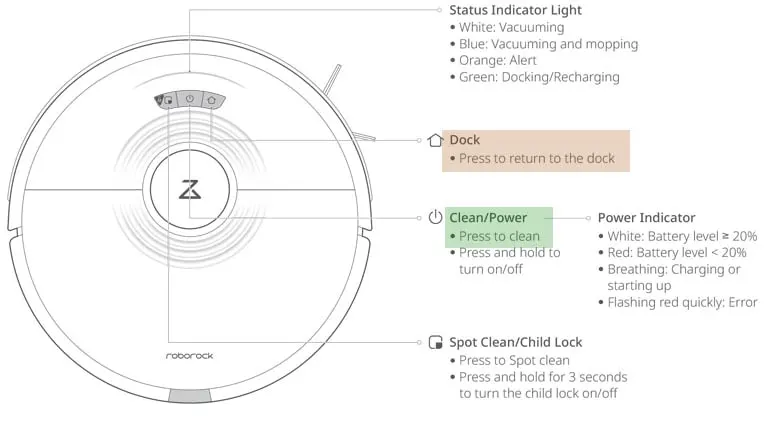
Press the Clean button to start. The robot cleans every area it can reach. To send it back to the dock before it has finished, press the Dock button.
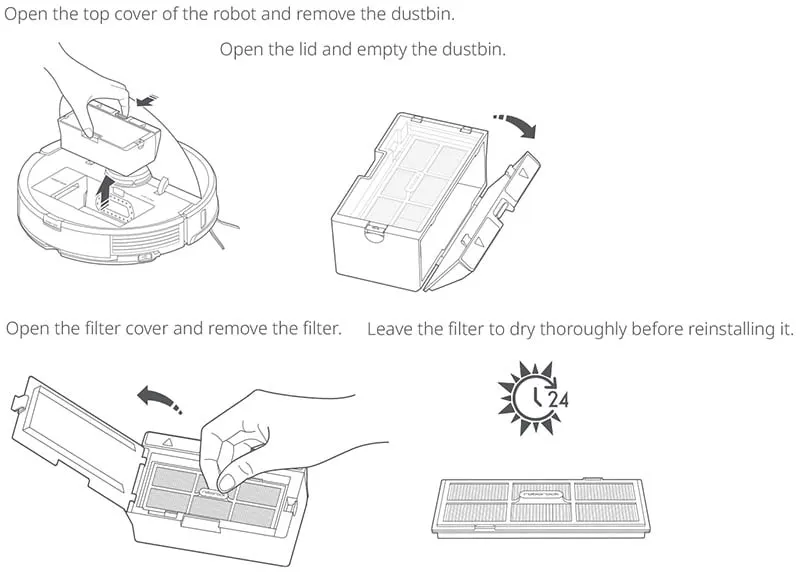
Empty the dustbin after a few cleaning runs, as shown in the picture. Tap the filter carefully to knock off the dust, and put it back in the robot.
Directions to the apartment
The easiest way is to use Google Maps from the car hire at Málaga Airport to Casa Alise, Calle Francisco Cano 90, Fuengirola: open the directions in Google Maps (opens in new tab).
The map below shows the last part of the way, with the entrance to the pedestrian one-way street seen from two angles.
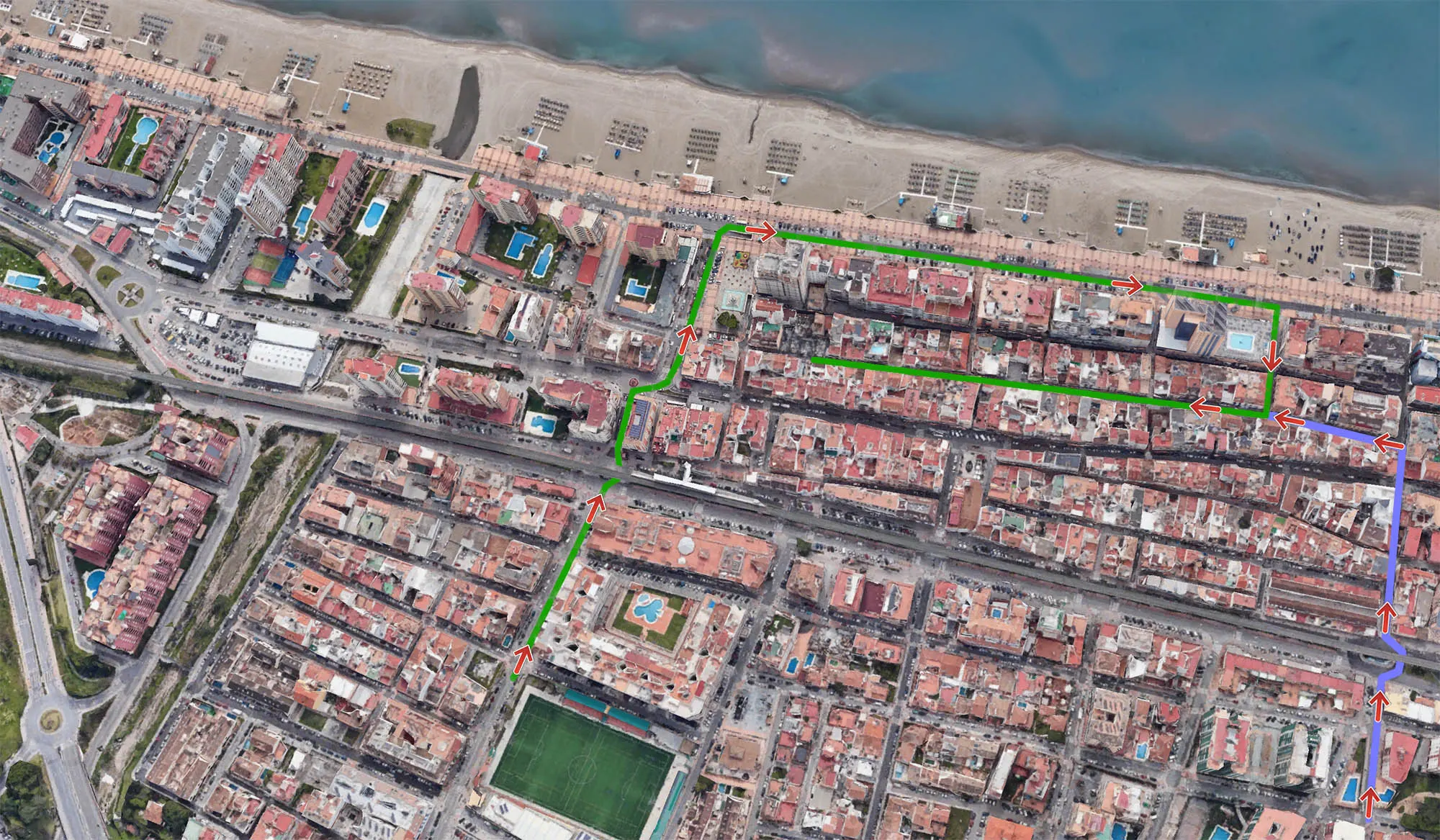
GPS coordinates (WGS84 decimal): latitude 36.553675, longitude -4.6136338.